Grammarly Review: Is It Good for Novelists? (2025)
Table of Contents Show
A Grammarly review by a book editor
Welcome to the fourth installment of our series of review of AI-powered editing platforms. Today, we’re digging into Grammarly Pro (previously Grammarly Premium). If you’d like to read our other reviews, you can find them at the links below:
With these reviews, our goal is to help writers make the best decisions about their work. There are plenty of reviews out there comparing price, ease of use, and features for these platforms. We’ll touch on some of these elements, of course, but what we really wanted to know is how they can serve fiction writers—especially novelists.
A disclaimer
If you read our previous installments, feel free to jump down to the beginning of the review.
Before diving, I want to say as clearly as I can that I believe human editors are irreplaceable. No AI is capable of what a good human editor can do for you. You might be thinking, Well, naturally. You’d like to keep your job. And you’d be right. I’m honored to work with authors for a living, and, yes, I’d love to keep doing that! Storytelling is an extremely human, intensely personal, and extraordinarily intricate process of imagination, creativity, and technical skill, and that means human feedback on what’s produced is essential.
We highly encourage you to seek out other people when it comes to getting feedback on your work—critique partners, a trusted friend, a reliable reader, an editor. As we well know, however, finding good critique partners is easier said than done, and friends and family often don’t have the time to read. Readers may not have the skills to help you improve, and you may not have the resources to hire a professional editor.
These various circumstances make AI an appealing alternative—especially for indie authors looking to keep costs low—and the two of us here at Ground Crew Editorial want to help you navigate your options, giving you our perspective on each of these platforms from our editorial viewpoint.
As always, our goal is to help you develop in your craft.
Our method
For these reviews, we’ve been using an old short story of mine (Jackie) as a base text. If you’ve read our other installments, you’ll notice Ariane isn’t taking this one. Because Grammarly’s tools focus on line and copyediting rather than big-picture feedback, I’ve decided to give her a break from digging through my story again and tackle this one myself. Because I wrote this tale many years ago now, I’ve had plenty of time away from the text to be coolly objective when it comes to evaluating suggested edits. For this review, I’ll be analyzing the edits Grammarly proposed in comparison to edits I would make for any author. I’ll be touching primarily on three areas:
· Type and quality of feedback—What levels of editing can this program give you? Is it good at what it does? Are the suggestions useful?
· User experience—Is it easy to use? How much control does the user have? Is this geared towards beginners or writing experts?
· External factors—What are the terms of service for using this platform? Is the work stored or shared with others?
Grammarly Review
Grammarly’s stated mission is “to improve lives by improving communication.” From the user interface to the tools themselves, Grammarly infuses this mission into each part of its platform, providing concise explanations, fun emojis, and a streamlined platform that relies on a chatbot-like interface that’s always available on the right. Grammarly offers a range of plans for users; however, Grammarly Pro is the newest paid plan, consolidating the strongest features of Grammarly Premium and Grammarly Business into one. This means the interface is designed for individuals as well as teams.
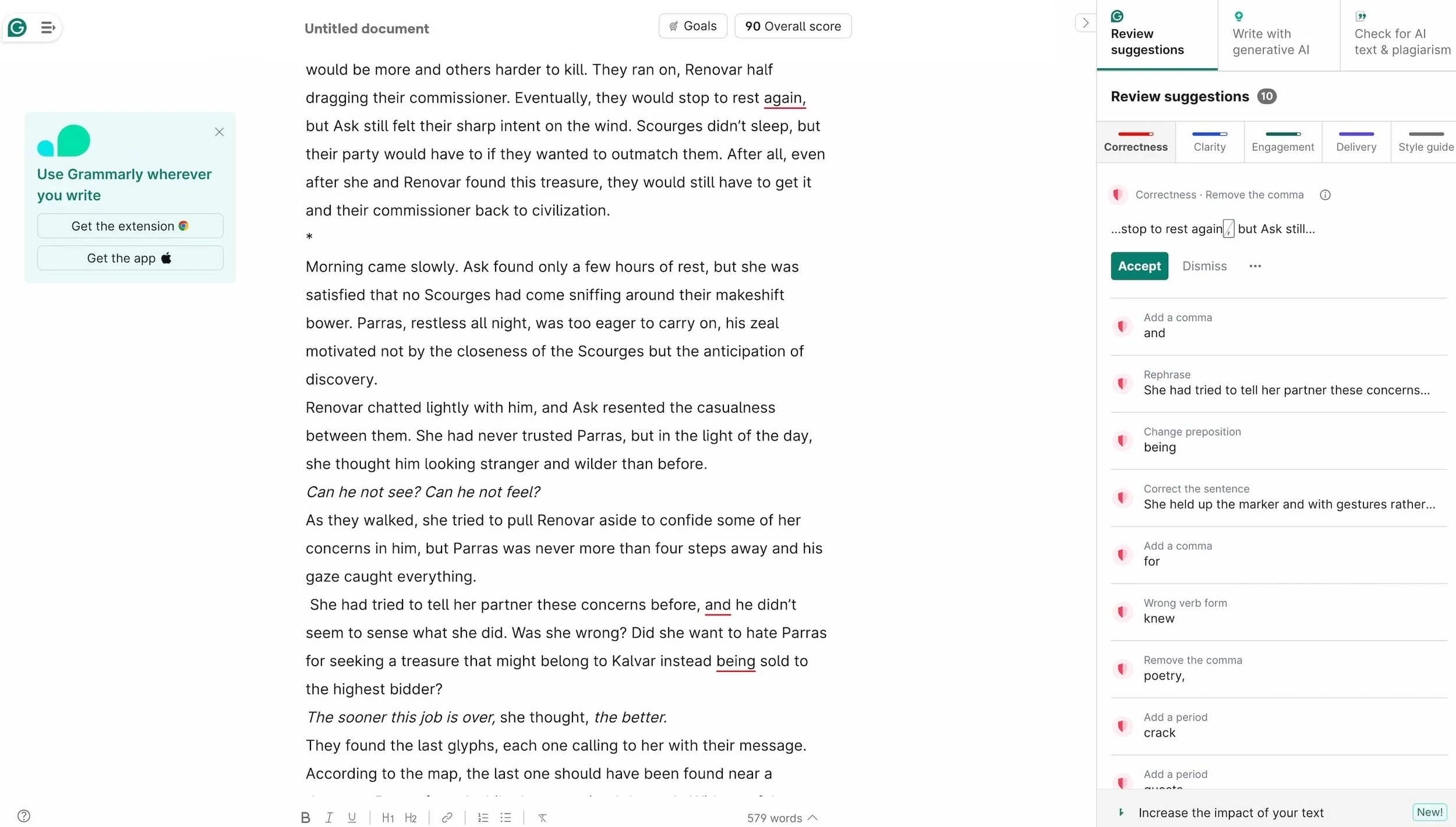
Like other platforms, Grammarly provides a dizzying amount of features through its AI-powered tools that offer suggestions, edits, and rewriting assistance for everything from shortening, adding more detail, addressing an expert audience or an informal one, making it funny, making it informative, or even transforming bullet points into prose.
Also like other platforms, Grammarly provides you with a score when you put in your text. For Grammarly Pro specifically, this score is based on a rubric set by the Goals button at the top of the window. As the platform states, “This score represents the quality of writing in this document. You can increase it by addressing Grammarly’s suggestions.”
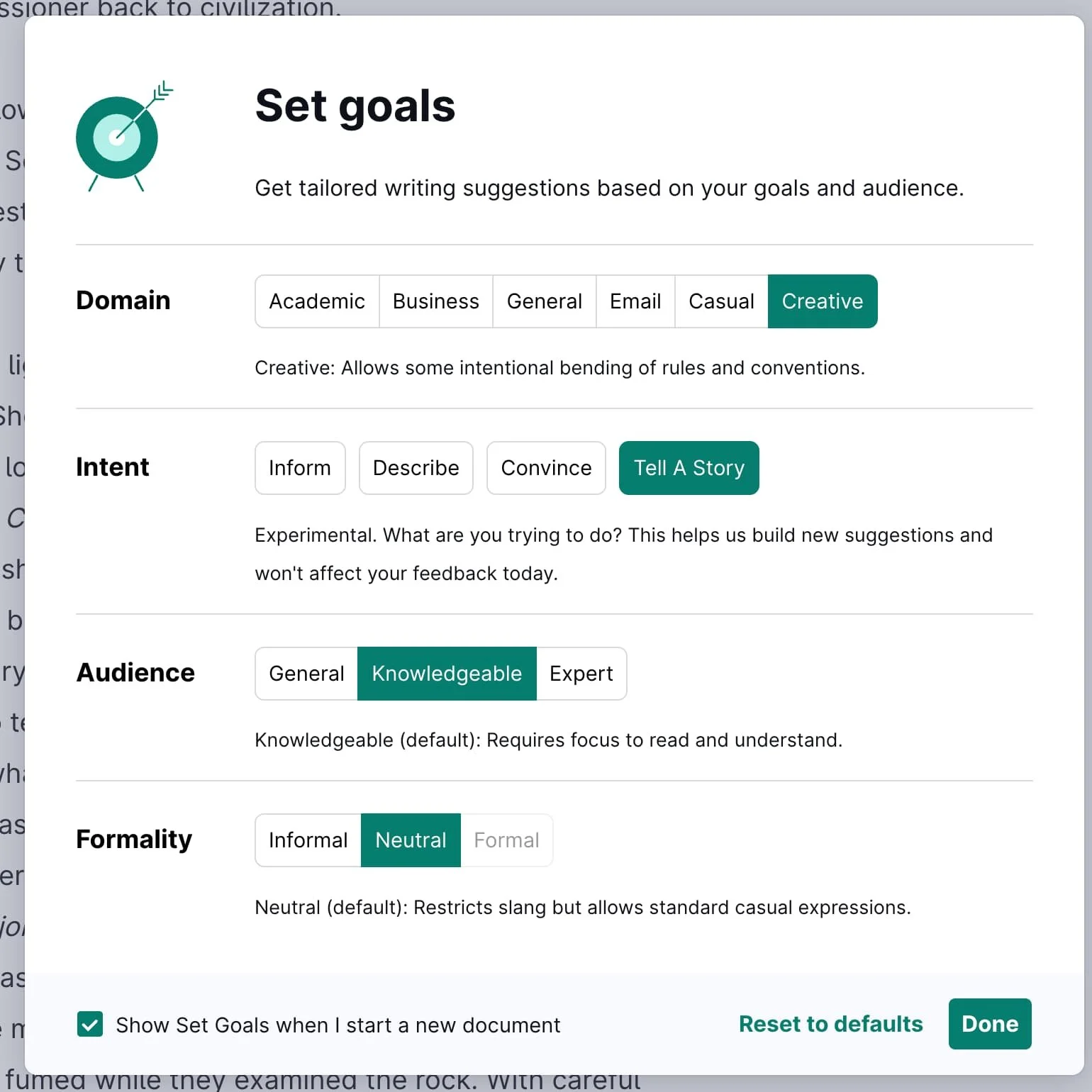
I was happy to see that my short story stacked up pretty well, and I went from 88 to 91 when I changed the settings for Domain in Goals to creative (from among academic, business, email, and casual) and to “Tell a story” under Intent. Audience was a little harder to set as I wasn’t sure how it would influence the results for fiction. For most of my review, I set my Audience on “knowledgeable” (which clarified this level as “requires focus to read and understand”). Under Formality, when Creative is selected, “formal” is grayed out, leaving only “informal” and “neutral.” I selected the latter (“restricts slang but allows standard casual expressions”). Later, I went back to play with some of these choices, but they did not change my score.
I will doing a deep dive into the features of this platform with lots of examples, so heads up—this post will be a longer read than usual! If you want the TL;DR version of this Grammarly review, see below.
Our review: short and sweet
Grammarly provides a ton of features, including AI-powered suggestions that cover a wide range of possibilities. However, these features and suggestions lean heavily on business and academic priorities—conciseness, text that’s easy to scan, short sentences—and enforce changes to style and voice, elements fiction writers are likely wanting to preserve. It is able to identify grammar errors, though its recommendations are not consistent, and many recommendations actually introduce errors rather than fix a problem. Grammarly’s suggestions also display many of the tells of AI-generated/assisted writing.
The platform has a rudimentary ability to analyze the work at a big-picture level, but given that Grammarly’s generative AI tools (which handle these big-picture inquires) can only process 1,000 words at a time, the suggestions are limited and not a good fit for fiction. Its insistence on more obvious and clear writing means more subtle turns in a story, open endings, or implied connections might be interpreted as issues with engagement and clarity.
Grammarly does address the common pain point of price, it’s straightforward to use, and it almost bends over backwards to be helpful, but the anecdotal stories of our fellow editors who have tried it bear out—Grammarly often introduces errors and flattens style, and its feedback is inconsistent.
Another disclaimer: Grammarly’s priorities
If you read the TL;DR and thought it a bit harsh, it’s important to talk about the context that Grammarly is assuming for the writers who use it. If you’ve been besieged by the same YouTube ads that I have, you might recall they star students finding breakthroughs for troublesome papers or employees drafting snappy emails that earn them kudos at the next meeting. In academic and corporate contexts, “communication” has a very different meaning and purpose than how we think of it in fiction, and though Grammarly’s emphasis on clarity, correctness, and engagement may seem to align with novelists’ goals, it assumes a context and audience with extremely different purposes. In other words, Grammarly isn’t really made with fiction writers in mind.
Business and academic writing prioritizes simplicity—in other words, writing that can be read and understood (in the case of business especially, quickly or without too much effort). From the start, Grammarly Pro feels much more focused on corporate communication rather than author–reader communication. Brand tones and team voice are often referenced, and throughout the website, you’ll find references to their priorities:
“Communication defines success in modern work.”
“We build AI that transforms how people communicate, making writing faster, clearer, and more impactful—no matter where you work or write.”
These examples demonstrate the importance of approaching Grammarly Pro with different expectations for the kind of feedback you’ll receive on your fiction.
Getting into the edit
Grammarly: Developmental capabilities
On the whole, Grammarly doesn’t offer useful tools for assessing longform writing. The AI tools can only analyze up to 1,000 words at time, so this naturally limits Grammarly’s ability to give you big-picture critique on what needs improvement. Knowing this limitation, I was braced for feedback that was restricted to the words that were being analyzed at the time and that it might not take further developments into consideration. This bore out in my experimentation with the various tools. I’ve written more about the two tools that did the most in regard to developmental editing below.
-
I selected different parts of the short story to try out these generative tools and played with the prompts to see what kinds of responses it would give me. For example, I tried out the “Increase your impact” feature on the opening paragraphs of the story. In the sidebar, Grammarly provided me with ideas under the heading of “Let’s create an engaging fantasy narrative.” It recognized the fantasy elements of my story, but while all of the suggestions were good ideas on their own, they might actually slow down the beginning of the story by asking the writer to develop far too much that won’t be important later on. Grammarly recommended highlighting the tension of the negotiation that’s taking place in order to feel high stakes, but the trouble here is first, the protagonist Ask isn’t actually in the tent where the negotiation is taking place and second, the negotiation actually has very little to do with the stakes. The main characters, Ask and Renovar, aren’t depending on this negotiation to go well—in fact, Renovar is so confident and smooth that the only surprise is that their commissioner, Parras, wants to tag along on this treasure hunt.
Another suggestion was to amplify the sense of impending danger to make the audience feel characters’ fear. While this is good advice generally, taking it at face value was another area where I felt the suggestion was weakened by not having more context than 1,000 words. In this story, Ask and Renovar are seasoned treasure hunters. Neither of them are really afraid of the Scourges, no more than they would be about wolves or bandits, and both are skilled fighters. Parras is seemingly harmless, and though Ask has a bad feeling about him, she doesn’t fear him either. Again, this suggestion might contribute more extra padding or even take the story in different direction if the writer were to follow its guidance. Developmentally speaking, the short story might be better served by having Ask actually be present for the negotiation rather than standing outside the tent as she is in this draft. This way, readers might get a better introduction to her, her conflict, and even meeting the character who will be the antagonist right away.
It’s also important to note that the recommendations for revising these instances were often just a phrase or additional sentence that underlined the point Grammarly thought needed to come across more strongly. For example, to “emphasize the characters’ resilience in the face of adversity to make the audience feel their determination,” Grammarly suggested adding this phrase to the end of a sentence talking about how Ask, used to warmer climates, is wrestling with the cold weather: “but she refused to let it break her spirit.” In this case, Grammarly latched on to Ask feeling cold and decided to try and expand it into a character moment. Unfortunately, Ask’s spirit really isn’t in any danger of breaking here, so addition this phrasing might feel a bit melodramatic and unnecessary, especially when completely different circumstances will test her resolve and spirit later on.
Some other recommendations it gave me were other generally good recommendations if taken with a grain of salt. Again, given that it’s only looking at 1,000 words of the text, it’s possible that these elements are addressed elsewhere, but since Grammarly doesn’t have a memory for what’s it’s analyzed already, there’s no real way of knowing if you’ve addressed the concern with revisions. I agreed with its point of enhancing character development for Ask, something Ariane noted in her own review of the short story. Grammarly said, “For instance, you could elaborate on her feelings about being away from Kalvar’s beaches and how that affects her current mood.” This seems to imply she’s missing the beach, which isn’t exactly correct, but there is room to dig into her emotions more. It did ask for more vivid description as well, and there’s probably almost too much there at the beginning as it is! It also recommended I explore character dynamics through dialogue between Ask and Renovar, and while I agree that sharing more about their history together on the page could be beneficial, Grammarly did miss the crucial detail that Ask can’t speak.
-
I found “Identify any gaps” to be mostly unhelpful due to the word count limitation. It asked a lot of questions about details that probably don’t need to be explored or that are brought up more naturally in the course of the story. For a shorter work, perhaps a flash fiction piece, this tool could be useful for ensuring you’ve got answers for questions that might come up, but they may not get at the real questions readers will be asking.
I also tried out the rewrite features and found that these were primarily limited to the suggestions that are recommended in the clarity and correctness tabs, which I’ll talk more about in the following sections.
This report might be useful for identifying places in your story that could be developed further for tension, heightening conflict that is already represented in some way on the page. However, it would be important to take even this list with a grain of salt as not all conflicts in a story should be amplified, and it may include conflicts that aren’t really there.
Grammarly: Line editing capabilities
As we dig into line editing, it’s important to remember the main concern with this level of edit: style and enhancing the story sentence by sentence. Most of Grammarly’s line editing tools are only available in the “Write with generative AI” tab, and this means feedback is limited to 1,000 words. These features span quite the range and give users a wide variety of prompts. Here are just a few:
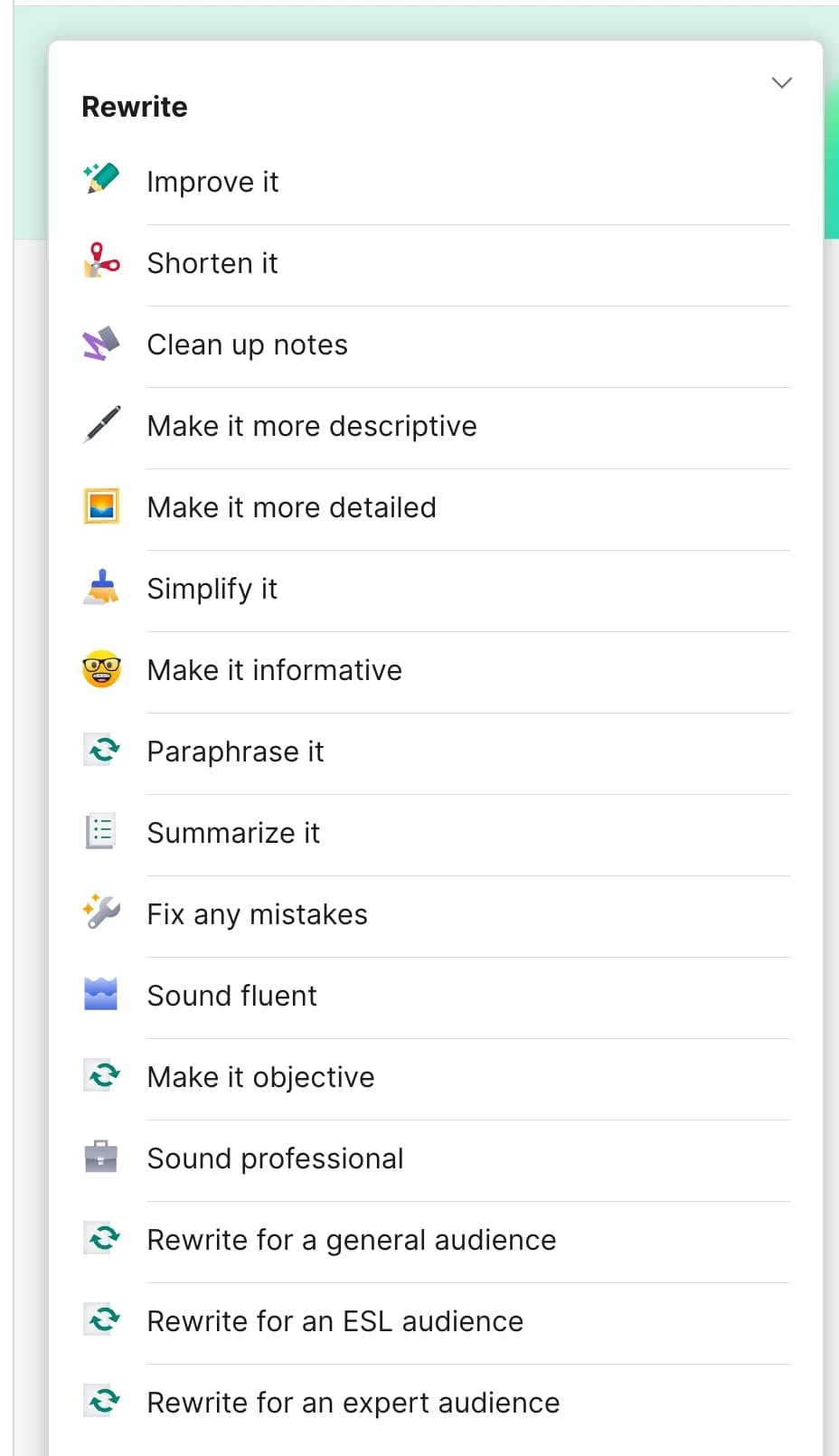
“Simplify it”
“Make it sound professional”
“Make it more descriptive”
“Make it more detailed”
“Improve it”
“Make it assertive”
“Make it friendly”
As I tried out several of these prompts with different portions of the text, I found that the majority of the suggestions were pretty much identical to the ones shared in the overall review under the Clarity and Correctness tabs. In short, the AI-generated recommendations produced just about the same results as the regular review, which isn’t restricted to 1,000 words. Some of the prompts, such as “make it inspirational,” did bring about funny results for this short story (which I’ll share below), but because of Grammarly’s tendency to suggest powerful and emotional language, I’d be wary of using these prompts without carefully assessing each suggested revision. The additions suggested by these prompts tend to fall back on similar phrasing, ideas, and writing that quickly tips towards the dramatic.
Grammarly’s dramatic tendencies
As I tried many of these prompts, the suggestions came back with wording that was over-the-top, unnecessary, or even melodramatic in certain contexts. The more of them I read, the more I realized that I’ve seen Grammarly’s suggestions before in the AI-generated and assisted manuscripts I’ve worked on for another company. Tone is such an important part of writing, and in short bursts, the phrasing that Grammarly provides could effectively impact a piece of writing, say, an email. However, because the program can’t remember what it’s already suggested, its suggestions can become repetitive and even start building a sense of unnecessary drama.
Below, I’ve highlighted some of the phrasing that I’ve come across many times over in other AI-assisted work, including in consecutive paragraphs. Remember, AI can’t remember what it’s already recommended, so the possibility of repetition or echoes is high.
Original: Around her, banter and bargaining beat back the cold air of the marketplace, haggling punctuated by the crack of burning logs.
Make it more descriptive: Traders and customers engaged in a symphony of banter and spirited bargaining, their voices rising and falling like a melody, as the crackling of burning logs punctuated the atmosphere with warmth.
The addition of musical language is interesting, but these particular uses are prime examples of AI writing I’ve seen employed over and over again, and the way this scene reads has changed to be a lot more joyful than the more subtly aggressive or edgy original wording. Also, punctuated with warmth?
Original: The Winter Wards were cruel in the darkest months, bitter and biting, and Ask was a stranger to them.
Make it inspirational: The Winter Wards emerged with a fierce chill, enveloping the world in a biting cold that teased the spirit. Yet, Ask stood strong, each breath a testament to her resilience, transforming into swirling mist before her.
Firstly, the Winter Wards is a place and can’t really “emerge” anywhere. Also, Ask is simply standing in the cold! As a side note, if editors could earn a nickel every time “resilience” appeared as a result of an AI suggestion, we could have all retired months ago.
Original: Wind tangled the embroidered flaps of the watched pavilion, revealing two men huddled over bowls of steaming ginger tea.
Make it more descriptive: Fragments of laughter danced on the breeze, and the colorful embroidered flaps of the pavilion fluttered like banners in the gusts, revealing two men nestled close together over steaming bowls of ginger tea. The fragrant steam curled upward, mingling with the joyful sounds around them, serving as a flickering beacon of warmth against the bitter chill that enveloped Ask in her silent watch.
This example demonstrates another weakness of AI-assisted suggestions—mixed imagery and confusing phrasing. Is the steam or the joyful sounds a flickering beacon of warmth? Either way, it doesn’t really make a lot of sense, and these additions might imply that Renovar and Parras are a lot chummier than they really are.
Original: Another conversation that will go on without me, she thought. She shrugged off the suggestion with a dusting of snow. The cold was making her brittle.
Improve it: Another conversation will unfold without me, she mused, shaking off the thought as a flurry of snow dusted her. The cold was indeed nipping at her resolve.
I’ve highlighted the wording here that appears often in AI writing. It makes the writing feel a bit stiff, especially in Ask’s thoughts, and here at the end is another attempt on Grammarly’s part to have the cold break Ask’s spirit rather than her simply being grumpy about being left outside.
Original: Somewhere in the fog, Scourges waited. Ask knew it. The dark creatures had been eating their shadows since the mountains.
Improve it: But lurking in the fog were the Scourges, their malevolence palpable. Ask felt their presence as they consumed shadows, having ventured far from their mountainous lairs.
This has less tells, but it’s added some odd passive voice in that opening line and “the” in front of Scourges, which might imply they’re more of an organized group rather than creatures. It’s also changed the meaning of the sentence, which was originally intended to imply Scourges are right on their heels rather than saying they actually eat shadows. Scourges also don’t have lairs in the mountains.
As I mentioned above, many of the features seemed to be pointing users back to the original suggestions provided in the overall analysis. “Improve it” and other features often resulted in simpler phrases and ideas. Here are some examples it offered:
“sticky unease”—> “unsettling feeling”
“old vexations”—> “familiar irritations”
“dismissive eye”—> “dismissive gaze”
“His eyes were bright with keenness”—> “His eyes were bright and keen”
Grammarly: Copyediting capabilities
Now we come to the real question—is Grammarly good at grammar? In short, yes and no. Grammarly is able to identify some important elements, catching missing words and typos, but when it comes to commas, the edits were inconsistent when it came to enforcing a rule. On the whole, it can identify major errors, but it also has a way of flagging things that aren’t necessarily errors but are simply not how Grammarly would say it, meaning shorter or easier to understand when read quickly.
Correctness
In the main overview, Correctness is the first report that pops up in the righthand panel. Generally speaking, this panel addresses grammar, focusing on commas and sentence construction. It was able to recommend some good, solid changes, but the comma suggestions varied. For example, sometimes when joining two independent clauses with a conjunction, it said there should be a comma and sometimes not. It also had difficulty with subject agreement in sentences featuring complex construction or wording, offering changes that would actually introduce errors. Commas with restrictive and nonrestrictive phrases were also pretty unpredictably punctuated, and misplaced modifiers were frequent suggestions for rephrasing. For more detailed look at this report, you can click through the headings below.
-
This short story has an inherent stumbling block attached to it since the main character’s name happens to be a verb. I don’t hold it against Grammarly that it couldn’t always distinguish between the character and the verb (none of the platforms we’ve looked at could manage this perfectly), but it meant several of the suggestions were addressing errors that weren’t actually errors. It also struggled with recognizing the name of a country and kept trying to make Kalvar (where Ask is from) into another character. Grammarly also flagged some of my made-up vocabulary, but I found later that users can create their own dictionary so these errors are no longer marked.
-
Grammarly was able to pick out a few instances of missing words (a kind of typo I often fall into when I’m really getting into a scene), but it also identified missing words in sentences where unusual verbs were used. Here’s an example:
“His shoulders hunched in permanent apology against the wind.”
It recommended putting “were hunched,” though that verb is perfectly acceptable on its own. This example shows how Grammarly looks for potential misreadings that might happen if someone were reading quickly. Grammarly also insists on articles (as we saw in one of the previous examples) where they aren’t necessarily needed, but again, it’s easy to see how these small changes are working to help with skimming (i.e., “Renovar was chameleon to any surroundings” vs. “Renovar was a chameleon”). Meaning was often impacted by the recommendations here.
Original “Certainly the words are Common, but I recognize that brushwork.”
Suggested: “Certainly, the words are common, but I recognize that they are brushwork.”
As you can see, these aren’t really the same sentence. “Common” in this story refers to the common tongue of the land (the capitalization being intentional), and it’s important in this moment that Parras is recognizing something in the way Ask writes that gives him a clue about where she’s from. (Put another way, he just saw her write, so it would be silly for him to say he recognizes that it was written with a brush.)
-
On the whole, the stories I’d heard about Grammarly from fellow editors were confirmed: The program recommends many changes that aren’t needed, doesn’t provide consistent edits, and many errors (and much confusion) would be introduced if all the suggestions were accepted. The Correctness suggestions did often stray beyond straight grammar and punctuation as well, and I felt that several of the suggestions put here really fit better in the Clarity category since they’re not necessarily errors as “Correctness” might imply.
Clarity
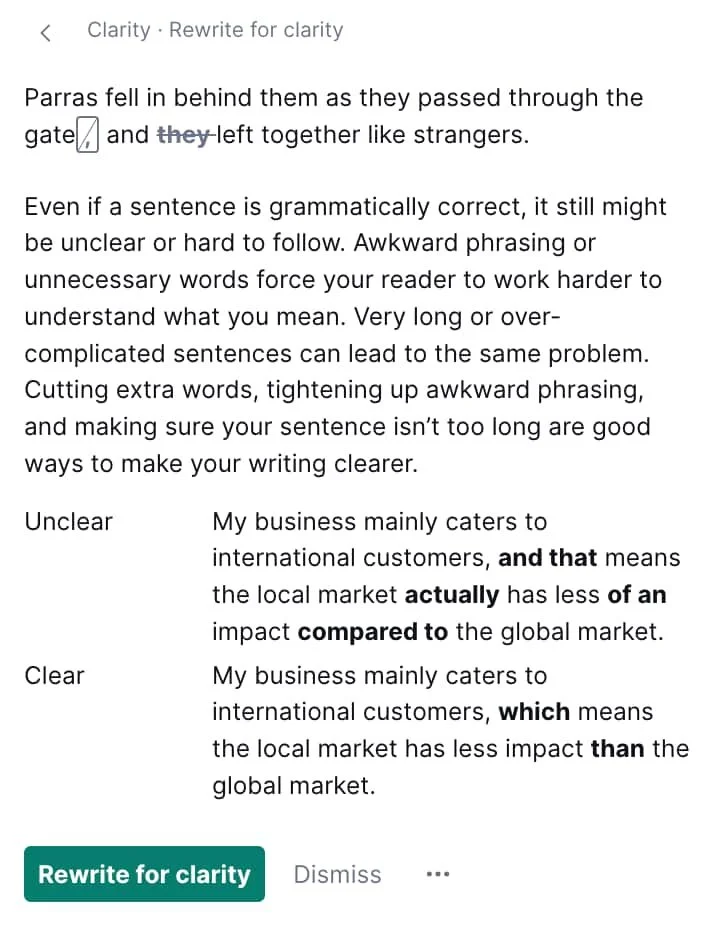
The Clarity tab offers a range of suggestions, including “remove the phrase,” “change the wording,” or “rewrite the sentence.” Most of these suggestions came down to shortening the sentence or the phrase rather than really revamping an idea for flow. It’s important to remember, as with all AI-powered platforms, it’s generally going to use what’s already there rather than present a new option that may solve the problem even better.
-
Some of the suggestions could be helpful for taking out passive voice and making the action more dynamic, but labelling these as changes for “clarity” might be misleading as the original meaning is clear. It’s also apparent that Grammarly has preferences when it comes to complex sentences, and it usually recommends changes that move the sentence towards simplicity, putting introductory phrases or appositives at the end of the sentence. Again, this is a change that benefits a skimmer, who might be confused by complicated sentences. Readers of fiction, however, usually enjoy a wide variety of sentence structures. Here are examples of the most common changes:
“every day” —> “daily”
“By the time”—> “when”
“some of the supplies”—> “some supplies”
“in silence”—> “silently”
“fresh curiosity”—> “curiosity”
“knew at once”—> “immediately knew”
My favorite change:
“Renovar stepped between her and the Scourges again.”—> “Renovar repeatedly stepped between her and the Scourges.”
(He’s simply coming to Ask’s rescue a second time rather than needing to continuously save her)
As you can see, most of these changes are moving the sentence in a more simple, shorter direction.
Engagement, Delivery, and Style Guide
I’ve grouped these three together because they didn’t provide much feedback on the short story or offered similar feedback as the other tabs. Engagement focused on many of the same things identified in Clarity, mostly different words as substitutes:
agreed—> decided
found—> saw
badly—>inadequately
tugged—>pulled
She’d spoken a true thing—> She’d spoken an actual thing (This one was my favorite)
In the Delivery tab, the feedback is based on a perceived “team tone.” The only thing it flagged for me here was this line:
At least it might be harder to track them in the dark.
Grammarly suggested moving this from “Uncertain” to “Confident” by rephrasing, saying “Adjusting tone may improve reception” by removing hedging language that could come across as uncertain or indecisive (again approaching this from a different writing intent than fiction). The Style Guide had no suggestions for me because I didn’t put my own style guide in.
User experience
Overall, Grammarly is very easy to use. The interface is clean and uncluttered, and the use of emojis and helpful tips ensures users can quickly find what they need. Explanations are readily available, and each suggestion has a button you can press to learn more about the problem it’s identifying. The explanations are helpful, but they are definitely written with business and academic concerns in mind (even the example sentences they provide are business oriented). Grammarly’s strengths are absolutely made for shortform writing; the tools all seem to be designed for that 1,000-word limit, and stretching them beyond that limit opens up the possibility for a lot of repetition, echoes, and compounded errors that would likely add more work than it would save. Grammarly is a good fit for writing that’s intended to be composed and digested quickly. This means it isn’t particularly adept or useful for long fiction such as novels.
External factors (a.k.a. I read the Terms and Conditions so you don’t have to)
I will start off by saying that while I did read the Terms and Conditions, I skimmed a lot of the other documents. Grammarly has several that go over how the platform works, expectations, and so on (Terms of Service, Customer Business Agreement, Third Party Component Notices, Acceptable Use Policy, etc.). For the most part, however, Grammarly is dedicated to its ideal audience: businesses. Their attention to security is based in real corporate concerns about leaks, intellectual property, and hacks, and Grammarly goes out of its way to provide resources that explain how information on the platform is protected and secured. They are also extremely transparent about their AI policy and development.
Grammarly’s AI is not trained on text that’s put into the platform, though it is trained the choices that users make as they choose to ignore or accept changes. Simply put, it learns by being used (though this may explain some of the inconsistencies when it comes to grammar). They also do not allow third parties to train on customer data, and they don’t sell it. Anything you create in Grammarly is yours, and you are free to license it and sell it royalty free, meaning Grammarly doesn’t own your work in any way. They do mention, however, that they may use your name or company logo (if you have a company account) to reach other to other people you might know to invite them to join Grammarly as well, sort of a “Hey, your friend Sam in accounting is using Grammarly—maybe you should too!” situation.
Because of Grammarly’s dedication to transparency, they have several pages dedicated to AI on their website to help demystify what AI is, what it can and can’t do, and many other topics that I might actually come back and read at another time.
The platform is very up front about encouraging people to disclose the use of AI tools. There’s a whole prompt that will list all of the prompts you’ve used that were created by Grammarly and any unique ones that you typed in yourself. There’s a button to copy and paste this right into the document. Grammarly also directly says you may not mislead any third party that output from Grammarly’s generative AI was human made.
Grammarly review: Conclusion
Grammarly’s tools are extensive, but they’re not designed with novelists in mind. The emphasis on making the text concise and as clear as possible means most of the suggestions push writers towards shorter, simpler sentences that have as little voice and style as possible. For a snappy blurb or back cover copy, Grammarly may be able to identify weak wording and provide more powerful alternatives for sentences, but my own experience with full-length books that rely on these tools too much shows it’s very easy to go overboard taking its advice wholesale. Its dramatic tendencies can easily take a well-written scene that just needs a bit of refining with careful word choice and make it into a parody of itself through language that’s not a good fit for the moment or the characters.
Grammarly offers a lot of tools that will help you shape dynamic, easy-to-understand paragraphs, but its emphasis on more corporate communication and the limitations of those tools make it a poor substitute as an alternative to hiring a human editor.
Have more questions?
There’s a lot of info here, so if you’re still processing or have questions about this Grammarly review, I’m happy to chat anytime at jackie[at]groundcreweditorial[dot]com.
Have another AI editing software you’d like us to review? Let us know!

Are you wanting someone to work closely with you on your writing?
We’re editors who can help you take your book to the next level, whether you’re needing big-picture feedback or a final line-level polish.